
Block Breaker Google: Play the Classic Arcade Game Online & Beat the High Score
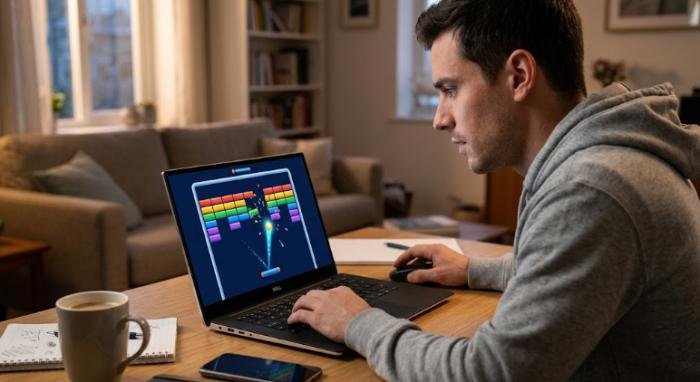
If you enjoy quick arcade games that are easy to start but challenging to master, block breaker google offers a simple way to enjoy classic paddle-and-ball gameplay directly through Google Search. Google introduced the current Block Breaker Search game in January 2025, adding it to the collection of interactive experiences available through Search.
Reputable coverage from 9to5Google reported that the game works across desktop and mobile web, as well as the Google app on Android and iOS. The concept is familiar to anyone who has played a traditional brick-breaker game: control a paddle, bounce a ball toward blocks, clear the playing area, and prevent the ball from falling below your paddle. However,
Google’s version adds several features that give the familiar formula a modern twist, including extra balls, a longer paddle, TNT, dual blasters, additional lives, and progressively refreshed rows of blocks. Whether you are searching for the game for the first time or trying to improve your score, understanding the basic mechanics can make your first few rounds much more enjoyable.
Read More: EtrueSports Codes: Latest Active Codes and Free Rewards
What Is Block Breaker Google?
Block Breaker Google is an interactive arcade game that appears within Google Search when the feature is available. According to 9to5Google’s January 29, 2025 report, users can search for “Block Breaker” and receive a game card with a Play button. Selecting it launches the game in a larger playing experience.
The game follows the familiar Breakout-style concept. A paddle moves horizontally near the bottom of the screen, while a ball travels around the playing area and strikes blocks. Your responsibility is to position the paddle so the ball continues bouncing rather than falling out of play.
Google’s implementation begins with four rows of blocks using Google’s recognizable blue, red, yellow, and green colors. Not every block behaves identically. Some are more difficult to break, while others can provide useful gameplay bonuses. Reported bonuses include extra balls, a longer paddle, TNT, and dual blasters inspired by the shooting mechanics associated with Space Invaders.
Why the Game Feels Familiar
The appeal of the game comes partly from its connection to the long-running Breakout-style arcade format. Atari’s Breakout, released in 1976, established the basic idea of using a paddle to bounce a ball into a wall of blocks. Over the decades, many games expanded that formula with power-ups, different block types, weapons, and more complicated layouts.
When Did Google Add Block Breaker?
The current Google Search Block Breaker was reported in January 2025. On January 29, 2025, 9to5Google reported that Google Search had gained the new game as another interactive Search experience. It joined other Google Search games and playful features, including familiar experiences such as Solitaire, Snake, PAC-MAN, Minesweeper, and other interactive tools.
The important point is that the current version should not automatically be confused with older Google experiments involving Atari’s Breakout. Google’s current Search game is a newer implementation with its own interface, bonuses, progression, and score display.
Is Block Breaker Google a Google Doodle?
It is more accurate to refer to it as a Google Search game. Google has created many interactive Doodles over the years, but not every interactive Google experience is a Doodle. Reporting about the January 2025 release identifies Block Breaker as a game built into Google Search.
If you are writing about the current game, calling it Google Search’s Block Breaker game is the clearest and most accurate description.
How to Play Block Breaker Google
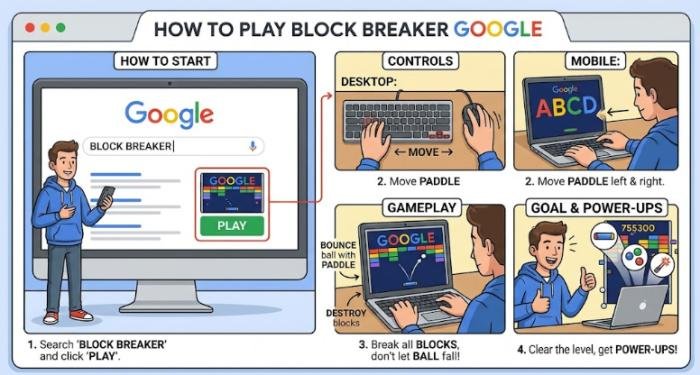
Getting started is straightforward when the game is available in Search.
Step 1: Open Google Search: Use Google Search from a desktop browser, mobile browser, or supported Google app.
Step 2: Search for “Block Breaker”: Type “Block Breaker” into the Google search field.The game’s Search card was documented as appearing after this query.
Step 3: Select Play: When the Block Breaker game card appears, select Play. The game opens into a larger interactive interface.
Step 4: Move the Paddle: Your first task is to keep the paddle underneath the ball. On desktop, 9to5Google reported that the game uses the left and right arrow keys. On mobile, the paddle can be controlled through touch-based interaction.
Step 5: Break the Blocks: As the ball moves around the screen, it hits the blocks. Your goal is to keep returning the ball while clearing the block formation. The longer you keep the ball in play, the more opportunities you have to increase your score and progress through additional rows.
Basic Gameplay Controls
The controls are intentionally simple, which makes the game suitable for quick sessions.
| Platform | Main control | Objective |
| Desktop | Left/right arrow keys | Move the paddle and return the ball |
| Mobile | Touch/direct manipulation | Position the paddle beneath the ball |
| Both | Game interface | Break blocks, use bonuses, and build your score |
The documented desktop controls use the left and right arrow keys, while mobile players can move the paddle using touch interaction. Because Google can change Search features over time, these instructions should be treated as practical guidance rather than a guarantee that every future version will use exactly the same controls.
The Basic Goal of the Game
The objective sounds simple: keep the ball alive and break the blocks. But successful play depends on timing and positioning. Watch the ball’s direction instead of focusing only on where it is at the moment. When it approaches the bottom of the screen, move the paddle toward the position where you expect the ball to arrive. If you react only when the ball is directly above the paddle, you may not have enough time to correct your position.
The first few attempts are therefore less about achieving an impressive score and more about developing a feel for the paddle’s movement. Once that basic control becomes natural, you can start paying closer attention to the blocks, bonuses, and opportunities to extend your run.
Block Breaker Google Power-Ups and Special Features
The basic paddle-and-ball formula is easy to understand, but block breaker google adds several features that make later rounds more interesting. Google’s Search version includes special blocks, bonuses, additional lives, and other arcade-style elements. 9to5Google reported these features when the game launched in January 2025.
Extra Balls
Some blocks can provide extra balls. Having multiple balls in play can help clear the board faster because more than one ball can strike blocks at the same time. However, multiple balls also make the game harder to follow.
When this happens, focus first on the ball most likely to reach the bottom of the screen. Keeping the paddle in a useful position is more important than trying to watch every ball equally.
Longer Paddle
Another reported bonus makes the paddle longer. This can be particularly useful when the ball is moving quickly because a wider paddle gives you a larger area for successful returns. If you receive this bonus, use the extra width to play more consistently rather than becoming careless.
TNT and Special Effects
TNT is another feature included in Google’s version. Certain blocks can trigger special effects, adding a more dynamic element to the traditional brick-breaking formula. These features are useful because they prevent every round from feeling exactly the same. Instead of simply waiting for the ball to destroy ordinary blocks one at a time, players have opportunities to change the pace of a round.
Dual Blasters
Google’s game also includes dual blasters. 9to5Google described this feature as a Space Invaders-inspired addition. The blasters give the player another way to affect the blocks and add a small shooting-game element to the familiar Breakout-style mechanics.
Extra Lives
Players start with three lives and can gain additional lives during gameplay. Lives are especially important during longer sessions. A player who protects each life has more opportunities to clear blocks and increase the score.
How to Improve Your Block Breaker Google Score
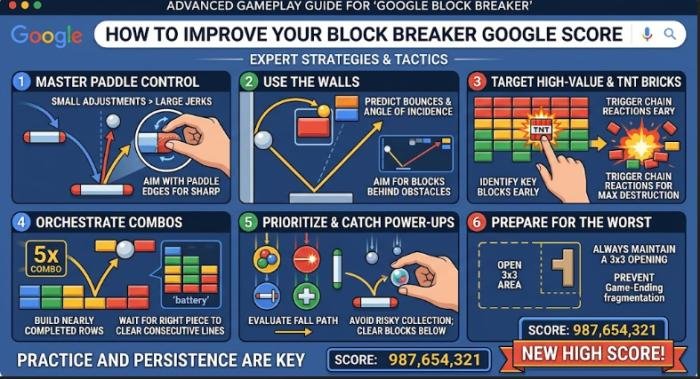
Getting a high score is less about moving the paddle as quickly as possible and more about making consistent decisions.
Watch the Ball’s Direction
Do not wait until the ball is directly above the paddle before reacting. Instead, watch its trajectory and begin moving toward the position where you expect it to arrive. This gives you more time to make a controlled adjustment.
Use Small Paddle Movements
Constantly moving the paddle from one side to the other can make it difficult to maintain control. Shorter movements are usually easier to correct. Your goal should be to place the paddle where the ball is going, not simply to keep the paddle moving.
Protect Your Lives
A common mistake is taking unnecessary risks for a bonus. If the ball is approaching the opposite side of the screen, chasing a power-up may leave your paddle out of position. In that situation, keeping the ball alive should usually take priority.
Pay Attention to Rebounds
The ball’s contact point with the paddle influences its subsequent direction. With practice, you can become better at anticipating where the ball will travel after each successful return. This is one of the most useful skills for players who want to move beyond casual play.
How Scoring and High Scores Work
The current Google Block Breaker interface displays a Score and High value. That gives players a clear reason to replay the game and try to improve their previous performance. However, a displayed high score should not automatically be described as an official worldwide record.
Website claiming that a particular score is the “official Block Breaker Google world record,” verify the claim before repeating it. Unless Google or a recognized record-keeping organization confirms the ranking, it is safer to describe it as a reported or personal score.
Can You Play Block Breaker Google on Mobile and PC?
The game was reported as available on desktop and mobile web, as well as through the Google app on Android and iOS. On desktop, the documented controls are the left and right arrow keys. On mobile, players can control the paddle through touch interaction.
Desktop play can be comfortable for longer sessions because the keyboard provides predictable movement. Mobile play is convenient when you want a quick game without a physical keyboard.
What If the Game Does Not Appear?
Google Search features can change over time, so availability should not be assumed to be permanent. If you cannot find the game, try searching specifically for “Block Breaker”, refreshing Google Search, trying another modern browser, or using the official Google app. Also remember that “Block Breaker” is a common game name.
Google Play currently contains unrelated apps with the same title, including games with completely different mechanics. For that reason, avoid downloading an app simply because its name matches your search. If you want Google’s Search game, begin with Google Search itself.
What If Block Breaker Google Is Not Showing?
Google Search features can change, so the game may not appear identically for every user or on every device. If you cannot find it, try searching specifically for “Block Breaker”, refreshing Google Search, using another browser, or checking the official Google app. Google’s current Block Breaker page also remains accessible as a Search game interface, although availability and presentation can change over time.
Avoid immediately downloading a third-party game just because it has the same name. “Block Breaker” is used by numerous unrelated games and websites.
Is Block Breaker Google the Same as Classic Breakout?
The games share the same fundamental arcade idea: a paddle controls a bouncing ball that destroys blocks. Google’s version is not simply a copy of the original Atari game. It adds modern features such as extra balls, a longer paddle, TNT, dual blasters, and additional lives. 9to5Google reported that the game was designed around the classic Breakout concept while giving it a Google Search presentation.
That combination makes it accessible to players who remember classic arcade games while remaining simple enough for newcomers.
Final Verdict
Block Breaker Google combines a familiar arcade formula with the convenience of Google Search. Its simple controls make it easy to start, while additional lives, special blocks, extra balls, TNT, and dual blasters give experienced players more to manage. For the best results, focus on consistency rather than frantic movement. Watch the ball, anticipate its path, protect your lives, and use power-ups when they genuinely improve your position.
Most importantly, make sure you are using Google’s actual Search game rather than an unrelated app or website with a similar name. When the game is available, it provides a convenient browser-based way to enjoy classic block-breaking arcade action without turning a simple gaming session into a complicated setup.
FAQs about block breaker google
Q1: What is block breaker google?
Ans: Block Breaker Google is an interactive arcade game available through Google Search. Players control a paddle, bounce a ball, break blocks, use special bonuses, and attempt to achieve a higher score.
Q2: How do I play block breaker google?
Ans: Search Google for “Block Breaker.” When the game appears, select Play. Desktop players can use the left and right arrow keys, while mobile players can use touch controls.
Q3: Is block breaker google free?
Ans: The Google Search version is presented as an integrated browser game rather than a conventional paid download. Be careful not to confuse it with unrelated Block Breaker applications.
Q4: Can I play block breaker google on my phone?
Ans: Yes. The game was reported as available on mobile web and through the Google app on Android and iOS.
Q5: How can I get a higher score?
Ans: Focus on predicting the ball’s path, making controlled paddle movements, protecting your lives, and using helpful power-ups without taking unnecessary risks.
Q6: Does the game have power-ups?
Ans: Yes. Reported features include extra balls, a longer paddle, TNT, dual blasters, and additional lives.
Q7: Does Block Breaker Google have a high-score display?
Ans: Yes. Google’s current game interface displays a score and a high-score field.
Q8: Why can’t I find the game in Google Search?
Ans: Search features can change over time. Try the exact search phrase “Block Breaker,” refresh the page, use another browser, or try Google’s official mobile app.



One Comment