Upgrades LCFGamestick: Latest Features, Updates and Gaming Improvements
Gaming has become a popular form of entertainment, and modern gaming devices make it easier than ever to enjoy different games at home. LCFGamestick is a convenient gaming option for users who want entertainment through a compact device connected to their television. However, like other electronic devices, getting the best experience depends on proper settings, regular maintenance, and compatible improvements. Keeping up with available upgrades can help users make their gaming setup more practical and enjoyable.
Upgrades LCFGamestick focuses on the different ways users can improve their gaming experience through software updates, storage management, controller compatibility, and performance adjustments. Whether you are a casual player or someone who enjoys exploring different gaming features, knowing which improvements are suitable for your device can make a real difference. In this article, we will discuss useful upgrade options, important features, safety considerations, and practical tips to help you get more value from your LCFGamestick.
What Is Upgrades LCFGamestick?
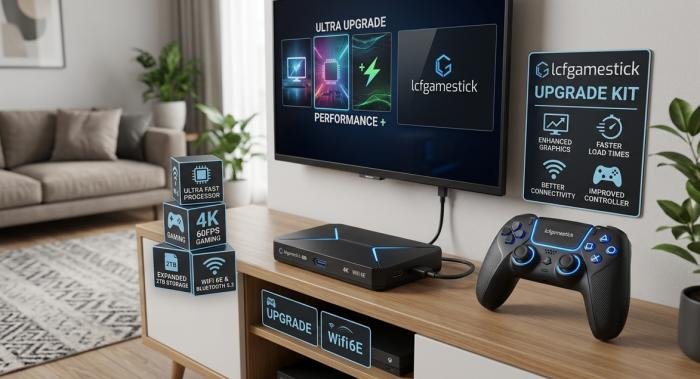
LCFGamestick is generally discussed as a compact HDMI gaming device designed to connect to a television and provide access to games through a small, convenient setup. Instead of requiring a traditional gaming console with a large body and multiple cables, this type of device offers a simpler way to enjoy gaming at home.
The term Upgrades LCFGamestick refers to possible improvements that can make the device more convenient, stable, and enjoyable to use. These improvements may involve software maintenance, storage management, controller configuration, display adjustments, and compatible accessories.
It is important to understand that different LCFGamestick versions may have different hardware and software capabilities. Therefore, not every upgrade will work with every model. Checking the exact device version before making changes is always a sensible decision.
Read More: Connectivity Issues HSSGamepad: Causes, Common Problems and Easy Fixes
Why Are LCFGamestick Upgrades Important?
Technology changes over time, and gaming devices also need proper maintenance to continue working reliably. A device that performs well initially may eventually experience storage limitations, slow menu navigation, controller connection problems, or software-related issues.
Upgrading and maintaining a gaming stick can help address these challenges. Rather than immediately replacing the entire device, users can start with simple improvements that target the problems they actually experience. Here are some reasons why users consider upgrading their gaming sticks:
- Better performance: Appropriate settings and software improvements can help make everyday operation smoother.
- Improved storage: Managing available space makes it easier to organize and access games.
- Controller reliability: Proper pairing and compatible controllers can improve gameplay.
- Better display settings: Adjusting resolution and screen proportions can improve the viewing experience.
- Software stability: Compatible updates may correct existing bugs and improve device reliability.
- Convenient navigation: Better organization can reduce the time spent searching for games.
The main purpose of Upgrades LCFGamestick is to improve the experience without making unnecessary changes that could affect the device’s normal operation.
Latest Features and Improvements to Consider
Gaming devices can offer different features depending on their hardware, firmware, and software versions. Some improvements are available through ordinary settings, while others may require compatible accessories or software updates. The following sections explain the most useful upgrade areas to consider.
1. Improved Gaming Performance
Performance is one of the biggest concerns for gaming enthusiasts. Players generally want games to start without unnecessary delays and respond properly to controller inputs. Performance improvements can begin with basic device maintenance. Closing applications that are not being used, avoiding unnecessary background activity, and keeping sufficient storage space available may help a device operate more consistently.
Some gaming sticks also provide settings that affect how games run. Users should review the available options and select configurations supported by their particular model. It is worth remembering that software adjustments cannot increase the physical processing power of a device. If a game requires more hardware resources than the gaming stick provides, changing settings will not turn it into a high-performance console.
2. Better Storage Management
Storage is another important area when considering gaming improvements. Gaming sticks may include internal storage, removable memory cards, or a combination of both, depending on the model. When storage becomes crowded, users may find it difficult to manage their game collections and available files. Keeping unnecessary files organized and removing content that is no longer needed can make everyday management easier.
A compatible memory card may also provide additional storage capacity when the device supports expansion. Before replacing or formatting a memory card, users should back up important files. They should also confirm the supported storage capacity and card format in the device documentation.
3. Updated Software and Firmware
Software and firmware updates can play an important role in maintaining gaming devices. Depending on the manufacturer and model, an official update may correct software problems, improve stability, or provide additional functionality.
Users should check whether their device has an official update option in its settings menu. If an update is available, they should read the accompanying instructions before installing it. A safe update process generally includes the following steps:
- Turn on the gaming stick and connect it to the television.
- Open the device settings.
- Find the system information or software update section, if available.
- Check the currently installed software version.
- Look for an official update supported by the exact model.
- Follow the manufacturer’s installation instructions.
- Allow the update to finish before restarting or disconnecting the device.
Not every LCFGamestick has automatic updating or the same settings menu. Some models may not receive new firmware at all. Avoid installing software from unknown websites. An incompatible firmware file can cause startup problems or make the device unusable.
4. Improved Controller Compatibility
A controller is one of the most important parts of any gaming setup. Even a good gaming device can become frustrating when buttons do not respond correctly or wireless connections repeatedly disconnect.
Users should check which controller types their particular gaming stick supports. Depending on the model, compatibility may include wired USB controllers or wireless Bluetooth controllers. Some useful controller improvements include:
- Replacing damaged cables.
- Checking battery levels before playing.
- Pairing wireless controllers correctly.
- Testing buttons and directional controls.
- Adjusting button mapping when supported.
- Keeping a spare compatible controller available.
Controller settings can also make games more comfortable to play. For example, players may prefer different button arrangements for racing, platform, or action games. The goal of Upgrades LCFGamestick is not simply to add new equipment. It is to make sure that the available controls work properly and match the player’s preferences.
5. Better Graphics and Display Settings
Visual quality can significantly affect the gaming experience. A properly configured television can make classic games appear clearer and more comfortable to play.
Depending on the device, users may be able to adjust resolution, aspect ratio, screen positioning, or other display settings. For example, some older games were designed for a 4:3 screen ratio, while modern televisions commonly use a 16:9 widescreen format. Selecting an appropriate display setting can help prevent unwanted stretching.
Users should also check their television’s picture settings. Excessive sharpening, incorrect scaling, or unsuitable picture modes may affect how older games appear. However, changing the output resolution does not necessarily improve the original graphics. The actual visual quality depends on the gaming stick’s hardware, the game itself, and the television.
Comparison Table: Different LCFGamestick Upgrade Options
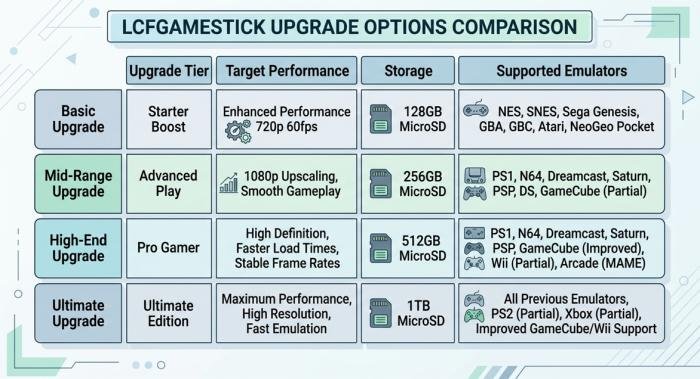
Different upgrades serve different purposes. The following table provides a simple comparison to help users decide which areas deserve attention.
| Upgrade option | Main purpose | Potential benefit |
| Software updates | Maintain system software | Bug fixes and stability |
| Storage management | Organize available space | Easier game access |
| Compatible memory card | Expand supported storage | More room for files |
| Controller improvements | Improve input reliability | Comfortable gameplay |
| Display adjustments | Configure screen output | Better viewing experience |
| Game organization | Arrange game collections | Faster navigation |
| Device maintenance | Reduce avoidable problems | More reliable operation |
| Compatible accessories | Improve the setup | Added convenience |
How to Upgrade LCFGamestick Safely
Making changes to a gaming device requires some preparation. Even a small mistake during a software or storage upgrade can result in lost files or unexpected problems. Anyone considering Upgrades LCFGamestick should begin with basic improvements before attempting advanced modifications.
Step 1: Identify Your Device Model
Start by checking the model number and hardware version. This information may appear on the device label, packaging, system information screen, or original documentation.
Knowing the exact model helps users avoid downloading incompatible software or purchasing accessories that will not work.
Step 2: Check the Current Software Version
Open the settings menu and find the system information section, if available. Check whether the device is already running the latest official software supported by its manufacturer. If the device does not provide an update option, do not assume that a random firmware file will work.
Step 3: Back Up Important Files
Before making major changes, copy important files to a separate storage location. This may include saved games, configuration files, personal game data, or other content that the device allows users to back up. A backup provides an additional layer of protection if an update fails or storage needs to be restored.
Step 4: Use Compatible Accessories
Always check compatibility before purchasing a memory card, controller, HDMI accessory, or power adapter. A product that works with one gaming stick may not work with another. Reviewing the manufacturer’s specifications can help prevent unnecessary spending.
Step 5: Test Each Improvement
Avoid making several major changes at the same time. Make one adjustment, restart the device if necessary, and test whether it works correctly. This approach makes it easier to identify the cause of a problem if something stops functioning.
Step 6: Keep the Original Configuration Available
Where possible, retain a backup of the original configuration and software. This can help users restore the device if an experiment does not produce the expected result. Following these precautions makes Upgrades LCFGamestick a more manageable process, particularly for people who do not have advanced technical experience.
Best Accessories for an Improved Gaming Experience
Accessories can make a gaming setup more practical. However, buyers should focus on compatibility and usefulness instead of purchasing every available product. Here are several accessory categories worth considering.
Wireless Gaming Controllers
Wireless controllers reduce cable clutter and provide greater freedom of movement. They can be useful for multiplayer sessions or when the television is positioned away from the seating area. Before purchasing one, confirm that the gaming stick supports its connection type.
USB Controllers
Wired controllers are another practical option. They do not normally require wireless pairing or separate controller batteries, making them convenient for users who prefer a direct connection. However, the device must have a compatible USB port and support the controller.
Memory Cards
A compatible memory card can help users manage additional files and supported game content. Choosing a reliable card from a reputable manufacturer is preferable to purchasing an unknown product based only on its advertised capacity.
HDMI Extensions
Some compact gaming sticks can be difficult to connect when a television’s HDMI ports are positioned close together. An appropriate HDMI extension can provide extra space and make installation easier. Users should choose an extension that meets the device’s connection requirements.
Power Accessories
Reliable power is important for stable operation. Always use the power adapter or cable recommended for the device. An unsuitable power supply may cause unexpected shutdowns, connection problems, or hardware damage.
How to Improve the Overall Gaming Experience
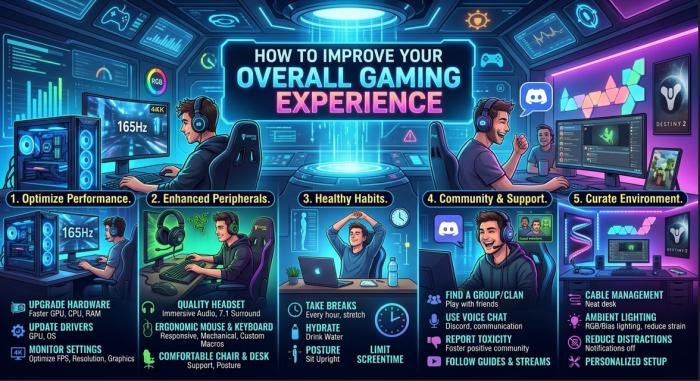
A gaming stick should be easy to operate, responsive, and comfortable for regular use. While hardware limitations cannot always be changed, several practical habits can help users get better results from their existing devices.
Keep the Device Clean
Dust can collect around electronic devices over time, especially when they remain connected to a television for long periods. Keeping the exterior clean and ensuring that ventilation areas are not blocked can help maintain suitable operating conditions. Use a soft, dry cloth to clean the exterior. Avoid applying liquids directly to the device or inserting objects into its ports.
Maintain a Stable Power Connection
Unexpected power interruptions can cause gaming problems and may affect software updates. Make sure the power cable is properly connected and that the adapter meets the manufacturer’s requirements. If the gaming stick repeatedly restarts, inspect the cable and power source before attempting more complicated repairs.
Organize Your Game Collection
A large game library becomes difficult to manage when files are stored without a clear structure. Organizing supported games into categories can make navigation easier. For example, users may arrange their collections according to game type, platform, or personal preference.
They can also create a favorites list if the software provides that feature. This simple improvement is an important part of Upgrades LCFGamestick because better organization saves time and makes the gaming experience more enjoyable.
Choose Suitable Display Settings
Not every game benefits from the same display configuration. Older titles may look better with their original aspect ratio, while other games may support widescreen output.
Users should test the available display options and choose the settings that provide the most comfortable viewing experience.
Avoid Unnecessary Background Activity
Some devices may run additional applications or services in the background. If the system allows users to manage them, closing unnecessary applications can help reduce avoidable resource usage.
Do not disable system services without knowing their purpose. Some background processes may be required for normal device operation.
Common Problems and Their Possible Solutions
| Common problem | Possible reason | Suggested solution |
| Slow menus | Limited resources or software issues | Restart and review settings |
| Games not loading | Unsupported files or compatibility issues | Check game compatibility |
| Controller disconnects | Low battery or pairing problems | Recharge and reconnect |
| No television display | HDMI connection problem | Check the HDMI port |
| Device restarts | Unstable power supply | Inspect the power adapter |
| Storage errors | Damaged or incompatible card | Check and back up storage |
| Audio problems | Incorrect sound settings | Review television and device audio |
| Update failure | Incompatible software or interruption | Follow official recovery instructions |
Fixing Slow Performance
If the gaming stick becomes slow, begin with a simple restart. Check available storage and close applications that are not required. If the problem continues, review the device settings and check for an official software update.
Players should remember that older or low-powered devices may struggle with demanding games. No software upgrade can guarantee that every title will run smoothly.
Resolving Controller Connection Problems
Controller issues can interrupt gameplay and make even simple games frustrating. Start by checking the controller battery, USB connection, or wireless pairing. If the device supports multiple controllers, test another compatible controller to determine whether the issue is related to the controller or the gaming stick.
Fixing Display Problems
If the television displays a black screen, check the HDMI connection and confirm that the correct television input is selected.
Users can also try another compatible HDMI port. If the screen remains blank, check the power connection and follow the device’s troubleshooting instructions.
Handling Software Update Errors
An interrupted or incompatible update can create serious problems. Never force a firmware installation using files intended for another device.
If an update fails, consult the manufacturer’s instructions for recovery options. Avoid repeatedly disconnecting the device while it is attempting to install software.
Are Custom Firmware and Advanced Upgrades Worth It?
Custom firmware is sometimes discussed as an advanced way to modify gaming devices. Depending on the hardware, custom software may offer different interfaces, configuration options, or emulator support.However, installing custom firmware is not a suitable choice for every user. Before considering this type of modification, check the following:
- Confirm that the firmware supports the exact hardware revision.
- Read the installation instructions carefully.
- Back up important files and saved data.
- Check whether the modification affects warranty coverage.
- Understand the possibility of software failure.
- Use reliable sources rather than unfamiliar download websites.
Some gaming sticks have limited documentation and may use different internal components despite having similar external appearances. For that reason, Upgrades LCFGamestick should not automatically mean replacing the original operating system.
Basic maintenance and official updates are often a better starting point for everyday users. Advanced modifications should only be attempted when compatibility is clearly established and the user understands the potential risks.
Who Can Benefit From LCFGamestick Improvements?
Different users have different reasons for improving their gaming setup. Some want a simpler interface, while others want better storage organization or more comfortable controls.
Casual Gamers
Casual players generally prefer devices that work without complicated setup procedures. Basic maintenance, suitable display settings, and reliable controllers may be enough to improve their experience.
Retro Gaming Enthusiasts
People who enjoy classic games may benefit from organized libraries, supported emulator improvements, and appropriate screen settings.
They should also check whether the games and software they use are compatible with their particular device.
Families and Home Users
A gaming stick can provide a convenient entertainment option for shared television use. Easy navigation, clearly organized game collections, and additional compatible controllers can make it more practical for family gaming.
Technology Enthusiasts
Users who enjoy adjusting settings may be interested in more advanced configuration options. They should research hardware compatibility and make backups before changing system software.
For all these groups, Upgrades LCFGamestick offers a useful starting point for thinking about improvements that match their individual gaming needs.
Important Safety Tips Before Making Changes
Making gaming improvements should never come at the expense of device safety or personal data. Keep these recommendations in mind:
- Download software only from trustworthy and verified sources.
- Never install firmware intended for a different hardware model.
- Back up important files before formatting storage.
- Avoid using unsuitable power adapters.
- Do not block ventilation openings.
- Check accessory compatibility before purchasing.
- Avoid suspicious websites offering modified software.
- Follow official instructions when installing updates.
Another important consideration is game ownership. Users should make sure that their game files and software are obtained and used legally. Device modifications do not provide permission to download or distribute copyrighted games without authorization.
Following these precautions can make Upgrades LCFGamestick safer and help users avoid problems that could otherwise interrupt their entertainment.
Future Possibilities for LCFGamestick Gaming
Gaming technology continues to develop, and compact gaming devices may benefit from improvements in several areas over time. One possible area is better software optimization. More efficient interfaces and improved application management can make supported devices easier to operate.
Another area is controller connectivity. More reliable wireless connections and broader accessory compatibility could make gaming setups more convenient. Storage technology is also developing. As compatible storage solutions improve, users may have more practical options for managing their personal game collections.
Display technology may offer further improvements as well. Better compatibility with modern televisions can help older gaming systems provide a more consistent viewing experience. However, these possibilities should not be confused with confirmed LCFGamestick product updates. Actual improvements depend on the manufacturer, hardware capabilities, and availability of supported software.
The future of Upgrades LCFGamestick will depend on how well developers and manufacturers support existing devices while responding to changing gaming expectations.
Conclusion
Choosing the right improvements can make your gaming experience more convenient, comfortable, and enjoyable. From keeping software updated to managing storage and using compatible controllers, small adjustments can help maintain your device and improve everyday usability. Before making any changes, always check your model specifications and follow reliable instructions to avoid compatibility issues or unexpected problems.
Ultimately, Upgrades LCFGamestick is about making smart improvements that match your gaming needs rather than making unnecessary modifications. By focusing on safe updates, proper maintenance, and useful accessories, you can get better value from your existing gaming setup. Take time to understand your device, choose suitable upgrade options, and enjoy a smoother and more organized gaming experience.
Frequently Asked Questions
Q1: What does Upgrades LCFGamestick mean?
Ans: Upgrades LCFGamestick refers to possible improvements for an LCF GameStick, including software maintenance, storage management, controller configuration, display adjustments, and other compatible enhancements.
Q2: Can Upgrades LCFGamestick improve gaming performance?
Ans: Yes, certain improvements may help the device operate more smoothly. Software maintenance, proper storage management, and suitable settings can improve usability. However, results depend on the device’s hardware and the games being played.
Q3: How can I update my LCFGamestick software?
Ans: Check the system settings for an official software update option. If an update is available for your exact model, follow the manufacturer’s instructions and keep the device connected to a reliable power source during installation.
Q4: Can I add more storage to my LCFGamestick?
Ans: Some models support expandable storage through compatible memory cards. Check your device specifications before purchasing a card, and always back up important files before making storage changes.
Q5: Are custom firmware upgrades safe for LCFGamestick?
Ans: Custom firmware can carry risks, including software failure, compatibility problems, and potential data loss. Only consider firmware specifically verified for your hardware version, and follow reliable installation instructions.