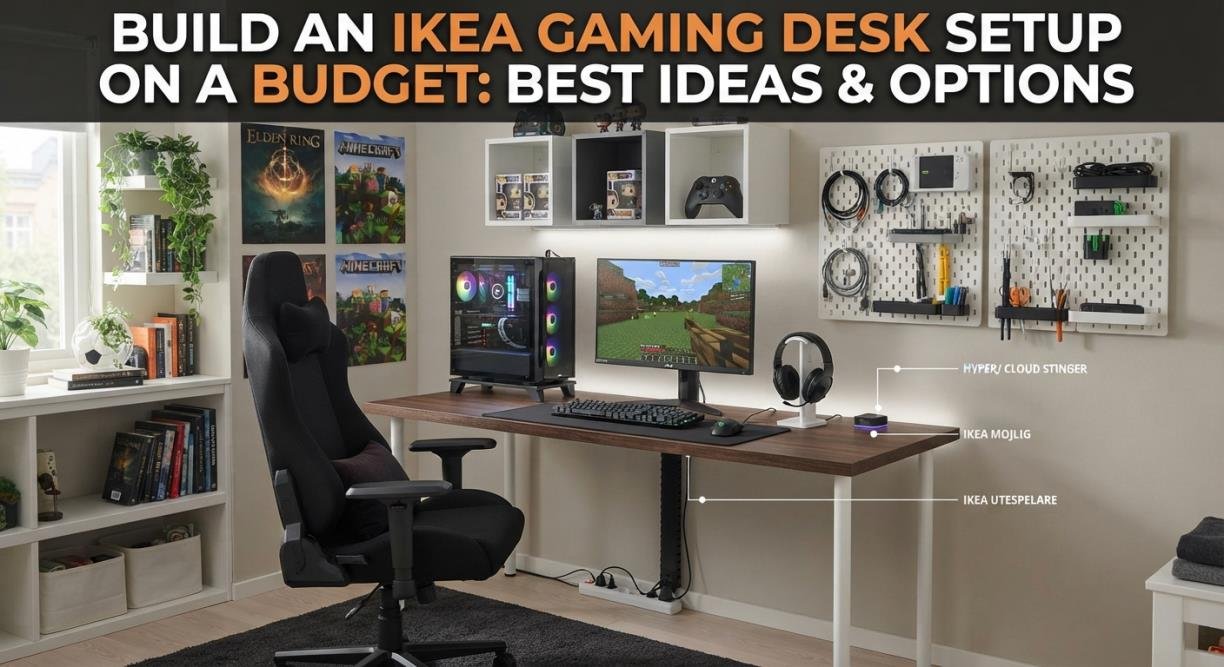
Build an IKEA Gaming Desk Setup on a Budget: Best Ideas & Options
IKEA gaming desk is a practical choice for anyone who wants a stylish, functional setup without spending a fortune. Instead of buying a fixed gaming desk with features you may never use, IKEA lets you choose the tabletop, drawers, legs, storage, and accessories separately.
This modular approach makes it easier to build around your room, equipment, and budget.The popular tabletop-and-drawer design remains a favorite because it offers plenty of workspace and built-in storage. However, a successful setup involves more than placing a tabletop on two drawer units.
You also need to consider desk depth, stability, monitor placement, cable management, ergonomics, and future upgrades. How to plan and build an IKEA gaming desk setup that looks good, performs well, and remains affordable.
Read more: Roborock Saros 10R Review: Smart Robot Vacuum for Homes
Why Choose an IKEA Gaming Desk?
The main advantage of an IKEA gaming desk is flexibility. You can create a compact workstation for a bedroom, a wide dual-monitor setup, an L-shaped desk for streaming, or a hybrid gaming-and-study area. IKEA furniture also has a clean, minimalist appearance. With the right colors and accessories, your setup can look modern without relying on excessive RGB lighting or expensive gaming furniture.
Key Benefits
- Flexible desk sizes and layouts
- Affordable storage options
- Easy to customize and rearrange
- Suitable for gaming, studying, and working
- Simple, modern appearance
- Easy to upgrade over time
Potential Drawbacks
- Some tabletops are not designed for very heavy equipment.
- Long surfaces may require extra support.
- Monitor-arm clamps may not suit every desktop.
- Accessories can quickly increase the total cost.
Plan Your IKEA Gaming Desk Before Shopping
Before choosing furniture, decide how you will use the desk. Many people buy a tabletop based on appearance and only later discover that it is too shallow for their monitor or too narrow for their mouse movement. Start by listing your equipment:
- Monitor or monitors
- Keyboard and mouse
- PC tower
- Speakers
- Microphone
- Controllers
- Laptop or notebook
- Charging devices
- Desk accessories
Single-Monitor Setup
A compact desk is usually enough for one monitor, keyboard, mouse, and headset. This option works well in a bedroom, dorm, or small home office. If your PC sits on the floor or on a separate stand, you will have more usable desk space. A compact setup also leaves more room for a larger mouse pad.
Dual-Monitor Setup
Two monitors require more width than many people expect. Two 24-inch displays may fit comfortably, but two 27-inch monitors can quickly consume most of the desk. A monitor arm can free up space, but check the tabletop construction before using one. Some lightweight surfaces may not be ideal for heavy clamp pressure or drilled mounting points.
Ultrawide Monitor Setup
An ultrawide monitor can create a clean, immersive gaming station. It may replace two screens, but it still needs enough depth for comfortable viewing and enough room for your keyboard and mouse.
Gaming and Study Setup
If you plan to use the desk for school or work, storage becomes more important. Drawers can hold notebooks, chargers, controllers, documents, and spare cables while keeping the main surface clear.
Best IKEA Components for a Budget Gaming Setup
The best IKEA gaming desk is usually a combination of components rather than one specific product. Your choice should depend on the size of your room, the weight of your equipment, and how much storage you need.
Choose the Right Tabletop
The tabletop determines your available workspace, so pay attention to both width and depth. Width affects:
- Monitor placement
- Speaker positioning
- PC placement
- Mouse movement
- Room for a second device
Depth affects:
- Monitor viewing distance
- Keyboard position
- Wrist comfort
- Mouse space
- Overall ergonomics
Use ALEX Drawers for Storage
ALEX-style drawer units are popular because they provide both storage and support. They are useful for keeping gaming accessories organized and reducing visual clutter. You can store:
- Controllers
- Headsets
- Charging cables
- Gamepads
- Documents
- Spare keyboards and mice
- Streaming accessories
Add Legs or Extra Support Where Needed
Long tabletops need proper support, especially when carrying multiple monitors, a heavy PC, speakers, and a microphone arm. Avoid treating a long tabletop like a bridge supported only at the ends. Depending on the surface and equipment, a center leg or rear support may reduce movement and prevent sagging.
Budget IKEA Gaming Desk Ideas
There is no single perfect configuration. The best build is the one that matches your equipment and leaves room in your budget for comfort.
Build 1: Basic Starter Setup
This is ideal for a first gaming PC or a student bedroom. Use:
- A compact tabletop or ready-made desk
- Simple legs or supports
- One monitor
- A large desk mat
- Basic cable clips
Build 2: Storage-Focused Setup
Choose a wider tabletop with one or two drawer units. This setup is useful if you also study or work at the desk. Drawers keep controllers, notebooks, chargers, and accessories out of sight. The result is a cleaner surface and less need for separate storage furniture.
Build 3: Dual-Monitor Workstation
For two monitors, choose a wider surface and keep the center area clear. A compatible monitor arm can improve flexibility and create more room for your keyboard and mouse. Place the PC on the side that interferes least with your mouse movement. Measure the case footprint before deciding whether it belongs on the desk or floor.
Build 4: Small-Room Setup
A small room does not prevent you from creating a good gaming station. Use vertical space and keep the desk simple. Consider:
- One monitor
- Wall shelves
- A compact keyboard
- Wireless peripherals
- Under-desk cable storage
- A monitor light instead of a large lamp
How Much Should You Spend?
IKEA prices and product availability vary by country, so it is better to plan by priorities than rely on one fixed price.
| Setup Level | Main Priorities | Buy First | Best For |
| Entry | Stability and function | Surface, supports, cable clips | Students and first-time builders |
| Mid-range | Space and organization | Larger surface, drawers, monitor support | Most PC gamers |
| Higher-end | Comfort and customization | Premium surface, monitor arms, lighting, storage | Enthusiasts and creators |
How to Build an IKEA Gaming Desk Step by Step
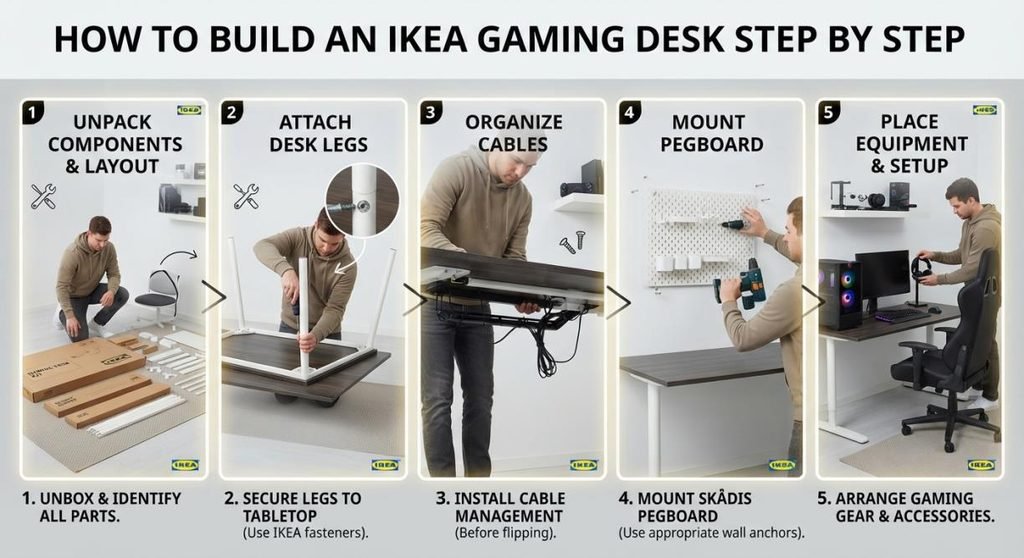
Step 1: Measure the Room
Measure the wall, floor depth, and available chair space. Check door swings, windows, outlets, and ventilation areas. A desk may fit against the wall but still be uncomfortable if the chair cannot move freely.
Step 2: Measure Your Equipment
Record the width and depth of your monitors, PC case, speakers, and accessories. If you plan to use a monitor arm, check the clamp requirements and desktop thickness.
Step 3: Select the Tabletop
Choose the smallest surface that comfortably fits your daily equipment. Extra space is useful, but unused space is still money spent.
Step 4: Plan the Supports
Position drawers and legs to distribute weight while preserving legroom. Do not place all heavy equipment in one unsupported area.
Step 5: Assemble and Level the Desk
Check every connection and adjust the feet until the desk is stable. A small wobble becomes especially annoying during typing or competitive gaming.
Step 6: Position the Monitor and Peripherals
Place the main monitor directly in front of you. Keep the keyboard and mouse close enough to avoid reaching, while leaving enough room for comfortable mouse movement.
Step 7: Manage Cables
Route cables before adding decorations. It is much easier to install clips, sleeves, and trays while the back of the desk is accessible.
Cable Management Tips That Work
Good cable management can make an affordable setup look far more polished. Separate cables into three groups:
- Power cables
- Display and data cables
- Charging and accessory cables
Use clips, sleeves, or an under-desk tray to keep cables away from your knees and feet. Keep the power strip accessible so you can safely disconnect equipment when needed.
Do Not Ignore Ergonomics
A good-looking desk is not successful if it causes neck, shoulder, wrist, or back discomfort.
Monitor Height
Position the primary monitor so you can view it without constantly tilting your head upward or downward. A monitor arm or stand can help achieve the correct height.
Keyboard and Mouse Placement
Keep your shoulders relaxed and your elbows near your sides. Avoid pushing the keyboard too far forward, as this can make you reach constantly.
Desk Depth
Depth is often more important than width. A wide but shallow desk may leave insufficient space between your eyes and the monitor.
Legroom
Do not fill the entire area beneath the desk with drawers. Open legroom allows you to change position and sit more naturally during long sessions.
Make Your Setup Look Better for Less
You do not need expensive accessories to create an attractive gaming station.
Choose a Consistent Theme
Use a limited color palette, such as a wood surface with black accessories or a white desk with neutral equipment. A consistent theme looks more intentional than a mixture of unrelated colors.
Keep the Center Clear
The center of the desk is your main work area. Place decorations, speakers, and storage toward the sides or above the desk.
Use Lighting Carefully
A desk lamp, monitor light, or subtle backlighting can add atmosphere without covering the desk in RGB products.
Hide Clutter
Use drawers, boxes, or small organizers for spare cables, controllers, chargers, and paperwork.
IKEA Gaming Desk vs. Dedicated Gaming Desk
A dedicated gaming desk may include built-in cable management, height adjustment, monitor shelves, cup holders, or a more aggressive gaming design. An IKEA setup is usually better for customization, storage, and long-term flexibility.
Choose IKEA if you want:
- Flexible sizing
- Built-in storage options
- A minimalist appearance
- Furniture that matches the rest of your room
- A setup that can be rearranged later
Advanced IKEA Gaming Desk Ideas
L-Shaped Setup
An L-shaped arrangement can separate gaming from studying, streaming, or creative work. Measure carefully because two surfaces can take up more space than expected.
Streaming Workstation
Streamers may need room for a microphone arm, camera, lighting, audio equipment, and multiple displays. Prioritize depth, support, and cable routing rather than focusing only on width.
Hybrid Workstation
If you work or study at the desk, prioritize ergonomics over appearance. A comfortable chair, correct monitor position, and clear workspace will improve your experience more than extra RGB lighting.
Future-Proof Design
Leave room for future upgrades. If you may add another monitor, speakers, or a larger PC, avoid building a setup that is already at maximum capacity.
What Many IKEA Desk Guides Overlook
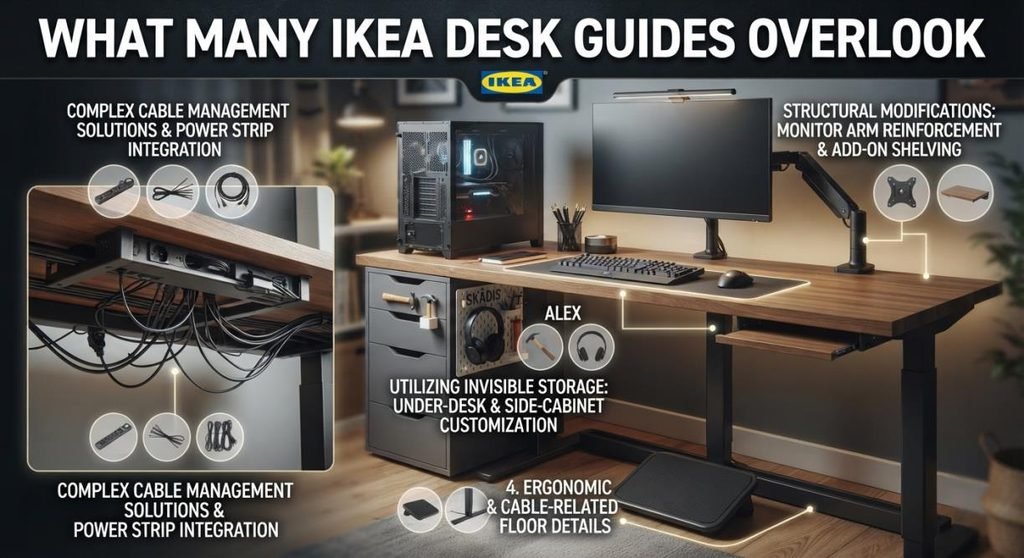
Many guides focus on the familiar tabletop-and-ALEX combination, but the most important decisions are often hidden behind the finished photo. A better planning order is: Space → equipment → support → ergonomics → aesthetics. This prevents you from choosing a beautiful desk that cannot comfortably hold your hardware. It is also wise to separate your furniture budget from your gaming-equipment budget.
A simple, Stable desk paired with a good chair and correctly positioned monitor can provide a better experience than an expensive desk covered in accessories. Modular furniture also has long-term value. You can rearrange it after moving, change the tabletop, add storage, or convert it into a work desk later.
Final Thoughts
Building an IKEA gaming desk on a budget is about making smart choices in the right order. Measure your room, measure your equipment, choose enough surface area, and provide proper support before focusing on appearance. The classic tabletop-and-drawer design remains popular because it offers flexibility, storage, and a clean look. However, you do not need to copy someone else’s setup exactly. A compact desk may be perfect for one gamer, while another may need a wide workstation with drawers, monitor arms, and extra support.
Focus on stability, comfort, monitor placement, legroom, and cable management first. Once those essentials are right, you can add lighting, shelves, and decorative accessories as your budget allows. With careful planning, even a modest IKEA setup can become a practical, attractive workstation that supports gaming, studying, streaming, and everyday use for years.
FAQs about IKEA Gaming Desk
Q1: Is an IKEA gaming desk good for PC gaming?
Ans: Yes. An IKEA gaming desk can be excellent for PC gaming when the tabletop is large enough, the supports are stable, and the equipment weight is distributed properly. Its main advantage is customization.
Q2: Can an IKEA desk hold two monitors?
Ans: Yes, but the specific tabletop and support system matter. Measure the monitors and check the desktop construction before using heavy stands or a monitor arm.
Q3: What is the best IKEA desk setup for gaming?
Ans: The best setup depends on your room and equipment. A compact desk suits one monitor and a small room, while a wider tabletop with drawers works better for dual monitors, storage, and work.
Q4: How much does an IKEA gaming desk cost?
Ans: The total cost depends on your country, tabletop, supports, drawers, and accessories. Start with the essential desk structure, then add cable management and decorative upgrades later.
Q5: Are IKEA tabletops strong enough for a gaming PC?
Ans: Some are, but not every tabletop has the same construction or load capacity. Check the product specifications and distribute heavy equipment carefully.
Q6: How do I stop an IKEA desk from wobbling?
Ans: Level the desk, tighten all connections, and confirm that the supports are positioned correctly. Long surfaces with heavy equipment may need an additional center or rear support.
Q7: Can I use an IKEA desk for gaming and studying?
Ans: Yes. Storage drawers, a clear tabletop, good monitor positioning, and a comfortable chair make IKEA desks suitable for both gaming and study.