15 Best Video Conference Tips for Professional Virtual Meetings
Have you ever joined an important virtual meeting only to face poor audio, a frozen screen, or an unprofessional background? These common issues can quickly damage your credibility, reduce engagement, and make even the best ideas difficult to communicate.
In today’s remote and hybrid work environment, virtual meetings are often the first impression you make on clients, employers, colleagues, and business partners. The good news is that these challenges are easy to overcome with the right video conference tips and a little preparation.
From improving your camera setup and lighting to mastering virtual meeting etiquette and communication skills, small changes can make a remarkable difference. In this guide, you’ll discover 15 practical video conference tips that will help you look more professional, communicate with confidence, avoid common mistakes, and run productive virtual meetings that leave a lasting positive impression.
Read More: 25 Fun Game Night Games Everyone Will Want to Play
Why Video Conference Skills Matter More Than Ever
Remote work and digital collaboration have transformed the way organizations operate. Companies now hire talent from around the world, clients expect virtual consultations, and teams collaborate across multiple time zones.
As a result, online meetings are no longer an occasional alternative—they are a core part of modern business communication. Mastering video conference tips not only helps you avoid technical problems but also improves your credibility, professionalism, and communication skills.
The Rise of Remote and Hybrid Work
Over the past few years, businesses have rapidly adopted remote and hybrid work models. Employees can now collaborate from home, coworking spaces, or while traveling. Cloud-based communication tools have made it possible for teams to stay connected regardless of location. Virtual meetings offer several advantages:
- Save travel time and costs
- Enable global collaboration
- Increase scheduling flexibility
- Support faster decision-making
- Improve work-life balance
Benefits of Professional Virtual Meetings
Professional virtual meetings create better experiences for everyone involved. Some of the biggest benefits include:
- Stronger communication with clients and colleagues
- Better collaboration among remote teams
- Higher engagement during presentations
- Improved trust and credibility
- More productive discussions
- Faster project updates and decision-making
Common Mistakes People Make During Video Calls
Many professionals unknowingly develop habits that reduce the quality of virtual meetings. Recognizing these mistakes is the first step toward improving your online presence. Some common issues include:
- Joining meetings without testing equipment
- Poor lighting that makes your face difficult to see
- Camera positioned too low or too high
- Distracting or cluttered backgrounds
- Speaking while muted—or forgetting to mute when not speaking
- Looking at the screen instead of the camera
- Multitasking during important discussions
- Weak internet connections causing lag or frozen video
Table of Contents
| Video Conference Element | Best Practice | Common Mistake | Why It Matters |
| Internet Connection | Use a stable wired or high-speed Wi-Fi connection | Relying on weak or unstable Wi-Fi | Prevents lag, freezing, and dropped calls |
| Camera Position | Place the camera at eye level | Camera too high or too low | Creates natural eye contact and a professional appearance |
| Lighting | Use natural light or a ring light in front of you | Sitting with a bright light or window behind you | Makes your face clear and improves video quality |
| Audio Quality | Use a quality headset or external microphone | Using a noisy built-in microphone | Ensures clear communication and reduces background noise |
| Background | Keep your background clean, organized, or blurred | Cluttered or distracting surroundings | Helps participants stay focused on you |
| Professional Appearance | Wear business or business-casual attire | Wearing overly casual clothing | Builds credibility and leaves a positive impression |
| Meeting Etiquette | Mute your microphone when not speaking | Leaving the microphone on unnecessarily | Eliminates unwanted noise and interruptions |
| Communication | Speak clearly, maintain eye contact, and listen actively | Speaking too fast or interrupting others | Improves engagement and understanding |
| Screen Sharing | Prepare files and close unnecessary tabs beforehand | Searching for documents during the meeting | Saves time and keeps presentations professional |
| Meeting Follow-Up | Share meeting notes, action items, and recordings | Ending the meeting without a summary | Improves accountability and keeps projects on track |
Test Your Equipment Before Every Meeting
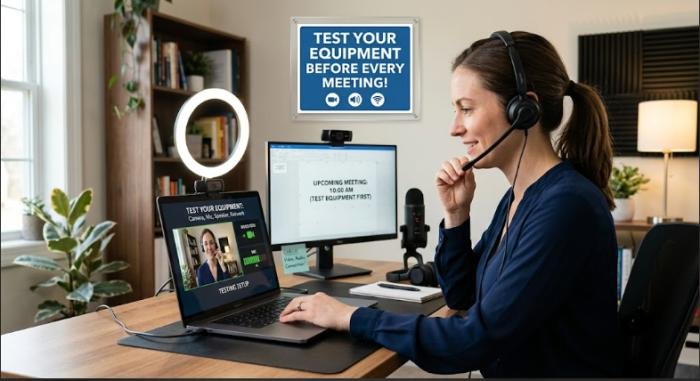
One of the best video conference tips is to test your equipment before joining a meeting. Technical issues can waste valuable time and create a poor first impression. Spending just five minutes checking your setup can prevent unnecessary interruptions. Before every meeting, verify that:
- Your webcam is working properly.
- Your microphone captures clear audio.
- Your speakers or headphones function correctly.
- Your meeting software is updated.
- Screen sharing works without issues.
- Your battery is fully charged if using a laptop.
Pro Tip: Keep a pair of wired earbuds nearby as a backup. If your Bluetooth headset disconnects unexpectedly, you can switch quickly without delaying the meeting.
Ensure a Stable Internet Connection
Even the best presentation loses its impact if your connection constantly freezes or drops. A reliable internet connection is the foundation of successful virtual meetings. Whenever possible:
- Use a wired Ethernet connection.
- Sit close to your Wi-Fi router.
- Close unnecessary downloads or streaming services.
- Disconnect unused devices from your network.
- Restart your router if performance slows.
Example
Imagine you’re presenting a sales proposal to a potential client. If your voice keeps cutting out because of poor internet, the client may lose confidence—not because of your ideas, but because communication becomes difficult.
Reliable connectivity is one of the most overlooked One essential recommendation, yet it has one of the biggest impacts on meeting quality.
Choose a Quiet and Professional Environment
Your surroundings communicate just as much as your words. Select a quiet location where interruptions are unlikely. A professional environment helps participants stay focused on the conversation instead of background distractions. Look for a space with:
- Minimal background noise
- Good lighting
- Clean and organized surroundings
- Limited foot traffic
- Comfortable seating
Expert Recommendation
A simple bookshelf, plain wall, or tidy office creates a far more professional appearance than a cluttered room or busy kitchen. A clean environment subtly reinforces your credibility and helps participants focus on your message rather than your surroundings.
Use Proper Lighting to Look Clear and Professional
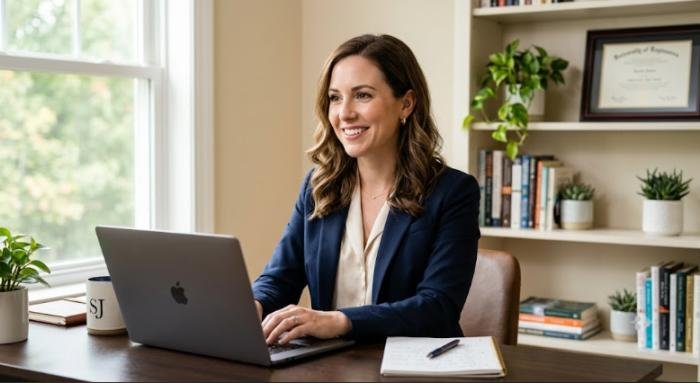
Lighting can dramatically affect how others perceive you during a virtual meeting. Even the best webcam cannot produce a high-quality image if the lighting is poor. Good lighting makes you appear more engaged, trustworthy, and confident, while dim lighting can make you look tired or difficult to see.
A useful practice is to position a light source in front of you rather than behind you. Natural daylight from a nearby window is often the best option because it provides soft, even lighting that flatters your appearance. If natural light isn’t available, a ring light or adjustable LED desk lamp works well.
Best Lighting Practices
- Face a window whenever possible.
- Avoid sitting with a bright window behind you.
- Use soft white lighting instead of harsh overhead lights.
- Eliminate strong shadows on your face.
- Test your lighting before important meetings.
Practical Example
Imagine you’re attending a job interview online. If your face is clearly visible with balanced lighting, you immediately appear more professional and approachable.
On the other hand, poor lighting may distract interviewers and reduce the impact of your communication, regardless of your qualifications. Investing in good lighting is one of the easiest ways to improve your virtual presence without spending much money.
Position Your Camera at Eye Level
Camera placement has a significant impact on how others perceive your confidence and professionalism. If your webcam points upward from your lap or downward from a high shelf, the viewing angle can feel awkward and distracting. Instead, position your camera at eye level so it creates a natural face-to-face conversation.
This simple adjustment is one of the easiest One essential recommendation is to implement, yet many professionals overlook it. How to Position Your Camera Correctly
- Place your laptop on a sturdy stand or stack of books.
- Keep your camera at eye level.
- Sit approximately an arm’s length from the screen.
- Keep your shoulders and upper body visible.
- Center yourself in the frame.
Expert Tip
When speaking, occasionally look directly into the webcam instead of constantly watching your own image. This creates the feeling of direct eye contact for everyone in the meeting.
Dress Professionally for Every Meeting
Even if you’re working from home, your clothing communicates professionalism and respect for the people you’re meeting with. Your appearance should match the purpose of the meeting. Client presentations, interviews, and executive meetings usually require business or business-casual attire, while internal team meetings may allow for a more relaxed dress code.
Following simple A useful practice is regarding dress can boost both your confidence and your credibility.
What to Wear:
- Solid-colored shirts or blouses
- Business casual clothing
- Neat grooming
- Simple accessories
- Wrinkle-free clothing
What to Avoid:
- Busy patterns that distract on camera
- Bright neon colors
- Clothing with large logos
- Overly casual outfits for professional meetings
Practical Insight
Studies in workplace psychology suggest that dressing professionally doesn’t only influence how others see you—it can also improve your own confidence and focus during important discussions.
Maintain Eye Contact with the Camera
Eye contact is a powerful communication skill in face-to-face conversations, and it remains equally important during virtual meetings. Many people naturally look at the faces displayed on their screen. However, this makes it appear as though they are looking slightly downward instead of directly at the audience.
One of the most valuable video conference tips is learning when to shift your gaze toward the camera.
Benefits of Camera Eye Contact:
- Builds trust
- Shows confidence
- Improves audience engagement
- Creates stronger connections
- Makes presentations feel more personal
Simple Technique
Whenever you’re explaining an important point, look directly into the camera for several seconds before glancing back at participants on your screen. With practice, this becomes natural and greatly improves your online communication.
Mute Yourself When You’re Not Speaking
Background noise is one of the biggest distractions during online meetings. Dogs barking, keyboard typing, phone notifications, traffic, or conversations nearby can interrupt the flow of discussion and make it difficult for others to concentrate.
Among the simplest video conference tips, using the mute button appropriately demonstrates professionalism and respect for other participants.
Mute Etiquette
- Keep yourself muted while others are speaking.
- Unmute only when you’re ready to contribute.
- Mute immediately after finishing your comments.
- Avoid typing loudly while your microphone is active.
Helpful Example
Imagine attending a meeting with twenty participants. If everyone’s microphone remains on, even small background noises quickly become distracting. Muting when not speaking creates a cleaner, more productive conversation for everyone.
Speak Clearly and at a Comfortable Pace
Virtual communication differs from in-person conversations. Audio delays, internet lag, and varying microphone quality can make speech more difficult to understand. Speaking slowly and clearly allows everyone to follow your ideas without asking you to repeat yourself.
Many communication experts consider this one of the most effective video conference tips for improving meeting quality.
Improve Your Speaking Style
- Speak at a moderate pace.
- Pause briefly between key ideas.
- Use simple, direct language.
- Pronounce words clearly.
- Avoid interrupting others.
Expert Recommendation
Instead of rushing through your presentation, pause after important points. These short pauses give listeners time to absorb information and reduce accidental interruptions caused by internet delays.
Keep Your Background Clean and Distraction-Free
Your background should support your professional image—not compete with it. A messy room, excessive decorations, or constant movement behind you can distract viewers from your message.
One of the most practical video conference tips is creating a simple, organized background that keeps the focus on you.
Good Background Options:
- Plain-colored wall
- Home office
- Bookshelf
- Company office
- Minimalist workspace
Virtual Backgrounds:
Many platforms allow virtual backgrounds or background blur. These features work well if:
- Your actual environment isn’t suitable.
- You want additional privacy.
- You’re working while traveling.
Pro Tip
Before joining an important meeting, open your camera preview and check everything visible behind you. Remove unnecessary items, improve lighting, and ensure nothing distracting enters the frame.
A clean, professional background helps reinforce your credibility and allows participants to focus entirely on your ideas.
Share Your Screen Effectively
Screen sharing is one of the most valuable features of virtual meetings, but it can quickly become distracting if you’re unprepared. Whether you’re presenting a report, demonstrating software, or reviewing a project, organizing your content beforehand helps your audience stay focused.
Video conference tips is to prepare everything you plan to share before the meeting starts. Close unnecessary tabs, organize your desktop, and open only the files you’ll need. This not only saves time but also prevents accidentally exposing personal or confidential information.
Best Practices for Screen Sharing
- Open all required documents before the meeting.
- Close unrelated applications and browser tabs.
- Hide desktop notifications.
- Zoom in on small text for better readability.
- Use a laser pointer or cursor highlight when explaining details.
Practical Example
Imagine presenting quarterly sales results to senior management. Instead of searching for files during the meeting, have your presentation open and ready. Smooth transitions between slides make your presentation look polished and professional while keeping everyone engaged.
Use Chat and Meeting Features Wisely
Modern video conferencing platforms offer features such as chat, reactions, polls, breakout rooms, and hand-raising tools. Using these features effectively encourages participation without interrupting the speaker.
Video conference tips is learning when to communicate through chat instead of speaking. For example, participants can post questions while the presenter continues speaking, allowing discussions to flow more smoothly.
Ways to Increase Engagement
- Ask participants to respond using reactions.
- Share helpful links in the chat.
- Use polls to collect opinions.
- Encourage questions throughout the meeting.
- Acknowledge participant contributions.
Expert Insight
Interactive meetings are often more productive than one-way presentations. Small opportunities for audience participation help maintain attention and improve knowledge retention.
Stay Focused and Avoid Multitasking
Multitasking during virtual meetings may seem harmless, but it reduces concentration and increases the likelihood of missing important information. Checking emails, replying to messages, or browsing unrelated websites can affect your ability to participate meaningfully.
Colleagues can often tell when someone isn’t fully engaged. Successful professionals follow video conference tips that emphasize active listening and complete attention during meetings.
How to Stay Engaged
- Close unnecessary applications.
- Silence phone notifications.
- Take notes during discussions.
- Ask thoughtful questions.
- Participate when appropriate.
Practical Example
During a project planning meeting, taking organized notes helps you remember deadlines and responsibilities while demonstrating that you’re actively involved in the discussion.
Manage Meeting Time Efficiently
Time management is one of the defining characteristics of productive virtual meetings. Meetings that start late, wander off-topic, or exceed their scheduled time often reduce engagement and productivity.
Good meeting leaders respect everyone’s schedule by following a clear agenda and keeping discussions focused.
Time Management Tips
- Share the agenda before the meeting.
- Begin on time.
- Introduce topics in a logical order.
- Allocate time for questions.
- End with a summary and action items.
Expert Recommendation
If a discussion requires more time than expected, schedule a follow-up meeting instead of extending the current one indefinitely. Participants will appreciate your respect for their time.
Record Meetings and Share Action Items
Recording meetings can be incredibly valuable, especially for training sessions, project updates, and client presentations. It allows participants who couldn’t attend to review the discussion later and ensures important information isn’t forgotten.
However, always inform attendees before recording and follow your organization’s privacy policies.
Video conference tips is pairing meeting recordings with concise action notes.
After Every Meeting
- Send a meeting summary.
- List key decisions made.
- Assign responsibilities.
- Include deadlines.
- Share the recording link if appropriate.
Real-World Example
After a marketing strategy meeting, emailing a short summary with assigned tasks helps everyone stay aligned and reduces misunderstandings. This simple habit improves accountability and keeps projects moving forward.
Professional Video Conference Best Practices at a Glance
| Area | Best Practice | Why It Matters |
| Technology | Test your camera, microphone, and internet before joining | Prevents technical interruptions |
| Environment | Choose a quiet, clean, and well-lit workspace | Creates a professional impression |
| Appearance | Dress appropriately and maintain good posture | Builds credibility and confidence |
| Communication | Speak clearly, maintain eye contact, and listen actively | Improves engagement and understanding |
| Meeting Management | Follow an agenda, manage time, and share action items | Increases productivity and accountability |
Expert Insight: What Most Competitor Articles Miss
Many articles simply list basic tips like “use good lighting” or “mute your microphone.” While those are important, truly successful virtual meetings depend on preparation before, professionalism during, and accountability after the meeting. What sets exceptional professionals apart is their ability to:
- Prepare a complete technical setup in advance.
- Encourage participation using interactive meeting tools.
- Keep discussions focused with a clear agenda.
- Follow up with concise meeting summaries and action items.
- Continuously improve by reviewing feedback and recorded sessions.
Conclusion
Virtual meetings are now an essential part of modern business communication, making strong online presentation skills more valuable than ever. By applying these video conference tips, you can improve your confidence, communicate more effectively, minimize technical issues, and leave a lasting professional impression.
Remember, successful virtual meetings aren’t just about having the latest technology—they’re about preparation, clear communication, active participation, and thoughtful follow-up. Start implementing these 15 practical tips in your next meeting, and you’ll quickly notice better collaboration, stronger relationships, and more productive discussions.
Whether you’re attending team meetings, presenting to clients, or interviewing for your next career opportunity, these best practices will help you stand out as a confident and reliable professional.
FAQs about Video conference tips
Q1: What are the most important video conference tips for beginners?
Ans: Beginners should focus on testing their equipment before the meeting, using a stable internet connection, choosing a quiet environment, positioning the camera at eye level, and speaking clearly. These simple habits create a professional first impression and help meetings run smoothly.
Q2: How can I look more professional during a virtual meeting?
Ans: Dress appropriately, maintain good posture, use proper lighting, keep your background clean, and make eye contact with the camera while speaking. These small adjustments significantly improve your professional appearance.
Q3: What internet speed is recommended for video conferencing?
Ans: For HD video calls, a minimum of 5 Mbps upload and download speed is recommended. If multiple people are using the same network, higher speeds provide a more stable experience.
Q4: Should I keep my camera on during online meetings?
Ans: In most professional meetings, keeping your camera on helps build trust, improves communication, and increases engagement. However, always follow your company’s meeting policies.
Q5: How can I reduce background noise during a video conference?
Ans: Use a quality headset, mute yourself when not speaking, enable noise suppression features, and join meetings from a quiet location whenever possible.
Q6: Which video conferencing platform is best for businesses?
Ans: Popular options include Zoom, Microsoft Teams, Google Meet, and Cisco Webex. The best choice depends on your organization’s collaboration needs, security requirements, and budget.
Q7: Why is eye contact important in virtual meetings?
Ans: Looking into the camera creates the impression of direct eye contact, helping build trust, improve engagement, and make your communication more personal and confident.